AgentFS: Redefining AI Agent Architecture with a File System
Introduction: Where Does an AI Agent’s “Soul” Live?
When we talk about an AI agent, what are we really talking about?
On the surface, it’s a program that can converse and execute tasks. But look deeper and you’ll discover that what truly defines an agent isn’t the large language model behind it — that’s just a general-purpose “brain.” What makes an agent uniquely itself is the entire identity system built around that brain: who it is, what it remembers, what it’s good at, what rules it follows, what tools it uses.
We can call this information the agent’s “soul.”
So the question becomes: where should this “soul” data live?
The Dilemma of Traditional Approaches
In today’s AI agent ecosystem, the vast majority of platforms have chosen what seems like a natural path — databases. Whether relational databases (PostgreSQL, MySQL), vector databases (Pinecone, Weaviate), or proprietary storage formats of various cloud services, agent configurations, memories, and skill definitions are typically serialized into rows or documents in a database.
This approach is perfectly sound from an engineering standpoint, but it introduces a series of deep-rooted problems:
1. The Black Box Problem
What exactly has your agent “memorized”? What do its behavioral guidelines specifically say? In a database-backed solution, answering these questions requires writing query statements, using management tools, or relying on visualization interfaces provided by the platform. Data is locked inside a box that requires specialized knowledge to open. For non-technical users, this is almost entirely opaque. Even for technical users, the workflow of “open a database client, connect to the server, execute a query” is far less intuitive than simply “open a file.”
2. The Absence of Version Control
Your agent behaved differently yesterday than it does today — what changed? Databases don’t provide native version control capabilities. To implement change tracking, you need to build additional audit log systems, change record tables, or snapshot mechanisms. All of these are achievable, but they represent “extra work” — not capabilities the system naturally possesses.
3. The Portability Barrier
Want to migrate your agent from Platform A to Platform B? In a database-backed solution, this means export, format conversion, and import — each step potentially losing information or introducing incompatibilities. Not to mention that many platforms don’t even provide complete data export functionality, effectively “locking” your agent to a specific platform.
4. The AI-Friendliness Paradox
Ironically, many systems built for AI agents aren’t particularly friendly to AI itself. Large language models are naturally adept at processing text files — reading Markdown, parsing JSON, understanding YAML. But when they need to access data stored in a database, they must go through API adaptation layers, ORM mappings, query builders, and a series of middleware. Each layer adds complexity, and each layer is a potential point of failure.
5. The Loss of Offline Availability
In cloud-first architectures, losing network connectivity means losing functionality. Your agent’s data is on a remote server, and locally there’s nothing. This isn’t just a technical limitation — it’s a philosophical regression: users lose physical control over their own data.
None of these problems are unsolvable, but they all point to the same root cause: databases are storage solutions designed for machines, not for human understanding.
At DesireCore, we chose a different path.
Part One: The Design Philosophy of AgentFS — “Files Are the Most Transparent Form of Data”
AgentFS is DesireCore’s core architectural innovation, and its central idea can be summarized in a single sentence:
Files are the most transparent form of data.
This isn’t merely a technical choice — it’s a philosophical one.
What Does “Transparent” Mean?
In the context of AgentFS, “transparent” has four layers of meaning:
Visibility: Data exists in formats that humans can directly read. No special tools are needed — a text editor is sufficient. agent.json is a JSON file, persona.md is a Markdown file. Open and understand — what you see is what you get.
Traceability: Every change is faithfully recorded. Who changed what, when, and why — this information is naturally obtained through Git’s version control, without building additional audit systems.
Portability: An agent’s entire state is a folder. Copy the folder and you’ve completely copied the agent. No database connection strings to configure, no cloud service dependencies to manage, no format conversions to perform.
Controllability: Users have complete control over their data. Files are on your hard drive — you can view, edit, back up, and delete them without any platform’s permission.
Why Are Files the Best Choice?
Let’s think about this from first principles.
What is the essential nature of an AI agent’s core data? It’s text. Identity descriptions are text. Behavioral guidelines are text. Skill definitions are text. Conversational memories are text. Even structured configuration information is merely text organized in JSON or YAML format.
The file system is the oldest, most mature, and most widely understood abstraction in operating systems. From Multics in the 1960s to today’s Linux, macOS, and Windows, file systems have undergone over half a century of evolution and validation. Every computer user — regardless of technical proficiency — understands the concepts of “files” and “folders.”
So isn’t it the most natural choice to store data that is essentially text using files?
It’s like asking “What’s the best vessel for holding water?” — the answer is a container. Not a database table, not a message queue, not a blockchain. Just a simple, intuitive, transparent container. Files are the natural container for textual data.
Core Tenets of AgentFS
Based on this philosophy, AgentFS is built on the following core tenets:
-
Humans First: The system’s primary audience is human users, not programs. Data formats and organizational structures should be directly understandable and operable by humans.
-
Simplicity Over Complexity: If something can be solved with a single file, don’t introduce an entire system. If a structure can be described with standard formats (JSON, Markdown, YAML), don’t invent proprietary formats.
-
Transparency Equals Trust: In an era of increasingly powerful AI, human trust in AI must be built on a foundation of understandability and inspectability. Opaque systems cannot earn lasting trust.
-
Local First: User data should primarily exist on the user’s device, with the cloud serving as a synchronization mechanism rather than primary storage. The system should be fully functional offline.
-
Git as Audit: Version control is not an optional add-on — it’s a foundational system capability. Every agent is inherently a Git repository.
These tenets collectively form the design foundation of AgentFS and define its fundamental difference from other agent platforms on the market.
Part Two: Lessons from Linux Philosophy — From Operating System to Agent Operating System
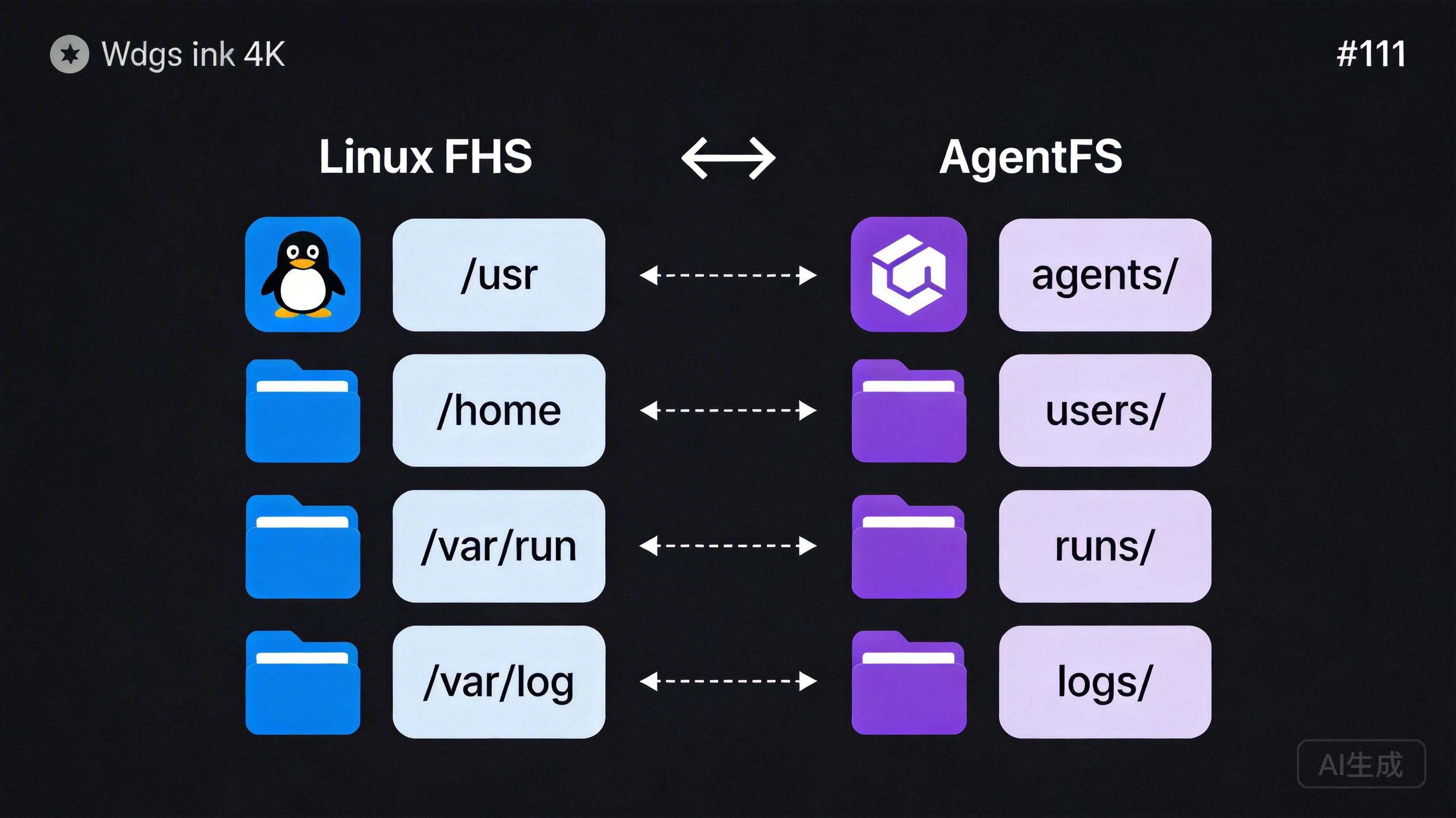
AgentFS’s directory structure wasn’t designed in a vacuum — it has a blueprint validated over half a century: the Linux Filesystem Hierarchy Standard (FHS).
Why Draw from Linux?
Linux’s file system design solved a problem strikingly similar to AgentFS’s: How do you organize all data in a complex system so that it’s both efficient for machines and understandable to humans?
The Linux FHS has been refined through decades of community discussion, practical validation, and iterative optimization, becoming one of the most successful file organization paradigms in the software world. Its core design principles — separation of concerns, clear hierarchy, and naming conventions — apply equally to organizing agent data.
The Mapping from Linux to AgentFS
Let’s examine the mapping:
Linux FHS                    AgentFS
─────────────────────────────────────────────────
/usr/share/app/         →    agents/<id>/
  Shareable software            Agent's "home"

/home/user/             →    users/<user_id>/
  User-private data             User-specific data

/var/run/               →    runs/
  Runtime temporary files       Execution records

/var/cache/             →    cache/
  Rebuildable cache             Cache data

/var/log/               →    logs/
  Log records                   Log records
This mapping isn’t a simple text replacement — it embodies deep design correspondences.
Inheritance of Design Philosophy
1. Separation of Software Identity and User Data
In Linux, /usr/share/app/ stores an application’s shared resources — they belong to the program itself and don’t vary by user. Meanwhile, /home/user/ stores each user’s private data — they belong to users and differ between individuals.
AgentFS inherits this critical separation. agents/<id>/ stores an agent’s core definition — its identity, personality, skills, and tools. These define what the agent “is” and can be shared, distributed, and cloned. Meanwhile, users/<user_id>/ stores private data generated by each user’s interactions with the agent — preference settings, private memories, and personalized configurations.
The benefits of this separation are substantial: you can distribute the same agent to a hundred users, each with their own private data space, without interference. Just as a hundred people can use the same software while keeping their documents and settings independent.
2. Isolation of Runtime and Persistent Data
In Linux, /var/run/ stores temporary data produced by running processes (PID files, socket files, etc.) that can be cleared after a system restart. /var/log/ stores log information that needs long-term retention.
AgentFS similarly distinguishes between runtime and persistent data. The runs/ directory stores execution context for each task — conversation history, intermediate artifacts, and execution state. This data persists after task completion, but its core value lies in retrospection and auditing rather than current operation. The agent’s core definitions (the agents/ directory) are persistent data requiring long-term maintenance.
3. Rebuildability of Cache
The design principle of /var/cache/ in Linux is: any data within it should be regenerable from other sources. If you delete the entire /var/cache/, the system may slow down (because caches need rebuilding), but no data is lost.
AgentFS’s cache/ directory follows the same principle. It may cache model inference results, vectorized document indices, or compressed resource files. Deleting the cache won’t damage the agent — it just means these data need to be regenerated on next use. This guarantee simplifies backup strategies and storage management — the cache directory can be cleaned at any time without worrying about data loss.
Standing on the Shoulders of Giants
Drawing from Linux philosophy isn’t just a technical choice — it’s an expression of conviction: good design doesn’t need to start from scratch.
The Linux file system works because it’s been used and validated by millions of developers worldwide. Its design patterns have been proven to elegantly handle data organization in complex systems. AgentFS stands on this giant’s shoulders, applying validated patterns to a new domain — agent data management.
For developers already familiar with Linux, AgentFS’s directory structure requires almost no learning. They can intuitively understand the purpose and organizational logic of each directory. This dramatically reduces learning costs and cognitive burden.
For users unfamiliar with Linux, they may not know these historical origins, but they benefit from the carefully designed organizational structure — clear hierarchy, explicit naming, logical categorization. Good design is friendly to everyone, regardless of whether they know the story behind it.
Part Three: Deep Dive into the Directory Structure — The Role of Every Directory and File
Now let’s open AgentFS’s “map” and explore the role of every directory and file in detail.
The Global View
~/.desirecore/
├── config/          # Global configuration
├── agents/          # Agent "homes"
│   └── <agent_id>/
│       ├── agent.json      # Basic info (identity card)
│       ├── persona.md      # Personality profile
│       ├── principles.md   # Behavioral guidelines (code of conduct)
│       ├── memory/         # Memory store (long-term memory)
│       ├── skills/         # Skill packs (skill certificates)
│       ├── workflows/      # Workflows
│       ├── tools/          # Toolbox
│       ├── heartbeat/      # Monitoring configuration
│       ├── resources/      # Reference materials
│       ├── assets/         # Static assets
│       └── .git/           # Version control
├── users/           # User-specific data
├── runs/            # Execution records
├── cache/           # Cache
└── logs/            # Logs
config/ — The Global Configuration Center
The config/ directory stores system-level configurations for DesireCore, not configurations for any specific agent. This includes:
- Global preferences (default language, theme, keyboard shortcuts, etc.)
- API key and service endpoint configurations
- Global registration info for plugins and extensions
- System-level security policies and permission configurations
Centralizing global configuration has two benefits: first, it prevents configuration information from scattering across multiple locations, making management difficult; second, in a multi-agent environment, global configuration only needs to be maintained once, shared across all agents.
agents/<agent_id>/ — The Agent’s “Home”
This is the most central part of AgentFS. Each agent has a directory named by its unique ID, containing all information needed to define that agent.
We like to compare this directory to the agent’s “home” — everything inside belongs to it, collectively constituting its complete existence.
agent.json — The Identity Card
{
  "id": "agent-2024-finance-assistant",
  "name": "Finance Assistant",
  "version": "1.3.0",
  "description": "An intelligent assistant focused on enterprise financial analysis and report generation",
  "author": "finance-team",
  "created_at": "2025-06-15T08:00:00Z",
  "updated_at": "2026-03-20T14:30:00Z",
  "model": {
    "provider": "anthropic",
    "name": "claude-sonnet-4-20250514",
    "temperature": 0.3,
    "max_tokens": 8192
  },
  "capabilities": ["text-analysis", "data-visualization", "report-generation"],
  "tags": ["finance", "enterprise", "reporting"]
}
agent.json is like a person’s identity card, recording the agent’s most basic metadata: its name, who it belongs to, what it can do, and what model drives it. This information typically doesn’t change frequently, but it’s crucial for identifying and managing agents.
Note the version field — agents are versioned. When an agent undergoes significant skill updates or personality adjustments, the version number increments accordingly. This aligns perfectly with software versioning principles.
persona.md — The Personality Profile
# Finance Assistant

## Role Definition
I am a professional enterprise financial analysis assistant,
skilled at processing complex financial data, generating clear
analytical reports, and providing insightful financial advice.

## Communication Style
- Uses professional but accessible language
- Data-driven: every conclusion is backed by data
- Proactively flags risks: alerts when anomalous data is detected
- Patient explanations: simplifies professional concepts with
  analogies for users without financial backgrounds

## Areas of Expertise
- Financial statement analysis (balance sheets, income statements, cash flow)
- Budget preparation and execution monitoring
- Cost structure analysis
- Financial compliance checks

## Boundaries
- Does not provide legal opinions or tax planning advice
  (will recommend professional consultants)
- Does not directly operate bank accounts or payment systems
- Clearly marks uncertain data as "needs verification"
Choosing Markdown over JSON for personality descriptions was a deliberate decision. Personality descriptions are essentially natural language text for AI to read — they need rich expressiveness, flexible structure, and good readability. Markdown perfectly meets these requirements.
Users can edit an agent’s personality as easily as editing an article, without needing to understand any data format or programming syntax. A product manager can open persona.md, modify the communication style description, save, and the agent’s behavior adjusts accordingly. This low-barrier editability is a core manifestation of AgentFS’s transparency.
principles.md — Behavioral Guidelines (Code of Conduct)
# Behavioral Guidelines

## Core Principles
1. **Data accuracy first**: Never fabricate or guess financial data
2. **Compliance first**: All recommendations must comply with relevant
   regulations and company policies
3. **Privacy protection**: Never disclose sensitive financial information
   to unauthorized individuals in conversations

## Decision Rules
- Operations involving amounts exceeding $100,000 must include a
  reminder for manual review
- Anomalies detected (deviation > 20%) must be proactively reported
- Cross-departmental data access requires prior permission verification

## Prohibited Actions
- Modifying audited historical financial data is prohibited
- Providing tax evasion advice is prohibited
- Accessing payroll data without authorization is prohibited
If persona.md defines the agent’s “personality,” then principles.md defines its “professional ethics.”
The existence of this file reflects AgentFS’s design thinking on AI governance. As AI agents take on more real business responsibilities, their behavioral boundaries need to be explicitly defined and strictly enforced. Storing these guidelines as plain text files means:
- Anyone can review these guidelines without a technical background
- Every modification to the guidelines is recorded by Git, creating a complete audit trail
- Compliance teams can review agent behavioral guidelines just like reviewing policy documents
- When problems arise, you can precisely trace through Git history exactly when, who, and which guideline was modified
This is what we call “transparency equals governance.”
memory/ — The Memory Store
memory/
├── episodic/          # Episodic memory
│   ├── 2026-03-15.md  # Interaction memories organized by date
│   └── 2026-03-16.md
├── semantic/          # Semantic memory
│   ├── domain-knowledge.md    # Domain knowledge
│   └── user-preferences.md   # User preferences
└── procedural/        # Procedural memory
    └── learned-patterns.md    # Learned patterns
Memory is one of the most dynamic types of agent data. AgentFS draws from cognitive science’s memory classification theory, dividing memory into three categories:
-
Episodic Memory: Specific interaction records and events. For example, “On March 15, 2026, the user requested an analysis of Q1 sales data, and I found that the Northern region’s sales decreased 12% year-over-year.” This type of memory enables the agent to recall specific past events and contexts.
-
Semantic Memory: General knowledge and cognition distilled from multiple interactions. For example, “The company’s fiscal year starts in April” or “The CEO is particularly focused on cash flow metrics.” This type of memory enables the agent to accumulate deep understanding of users and business contexts.
-
Procedural Memory: Learned behavioral patterns and operational procedures. For example, “When generating monthly reports, first check data integrity, then calculate core metrics, and finally generate visualizations.” This type of memory enables the agent to progressively optimize its working methods.
A key advantage of storing memory as files is that users can directly view and edit an agent’s memories. Discovered that the agent remembered incorrect information? Open the file and correct it. Want the agent to “forget” certain content? Delete the corresponding memory file. This level of control is typically unavailable in database-backed solutions.
skills/ — Skill Packs
skills/
├── financial-analysis/
│   ├── skill.json          # Skill metadata
│   ├── description.md      # Skill description
│   ├── examples/           # Usage examples
│   └── templates/          # Output templates
├── report-generation/
│   ├── skill.json
│   ├── description.md
│   └── templates/
└── data-visualization/
    ├── skill.json
    ├── description.md
    └── chart-configs/
Skills are modular expressions of an agent’s capabilities. Each skill is an independent subdirectory containing all information needed to use that skill.
This modular design brings several important advantages:
-
Plug and Play: Adding a new skill to an agent is simply placing a new skill directory into
skills/. Removing a skill means deleting the corresponding directory. No configuration file modifications or redeployment needed. -
Reusable: A well-crafted skill can be shared across multiple agents. Just like installing software packages, you can copy a validated financial analysis skill pack to every finance agent on your team.
-
Versionable: Each skill has its own
skill.jsonrecording version numbers, and skill update history is tracked through Git. This is critical for managing agent capability versions in enterprise environments. -
Testable: Usage examples in the
examples/directory also serve as test cases. You can use these examples to verify whether an agent has correctly mastered a particular skill.
workflows/ — Workflows
workflows/
├── monthly-report/
│   ├── workflow.json       # Workflow definition
│   ├── README.md           # Workflow documentation
│   └── steps/              # Detailed step definitions
│       ├── 01-data-collection.md
│       ├── 02-data-validation.md
│       ├── 03-analysis.md
│       └── 04-report-output.md
└── budget-review/
    ├── workflow.json
    └── steps/
Workflows chain multiple skills into a complete business process. They define “what to do,” “in what order,” and “to what standard.”
Each workflow step is an independent Markdown file describing the step’s inputs, processing logic, and expected outputs. This enables business experts — not just engineers — to understand and review every aspect of a workflow.
A typical workflow step file might look like this:
# Step 2: Data Validation

## Input
Raw financial data obtained from Step 1 (Excel or CSV format)

## Validation Rules
1. Check that required fields are complete (date, account, amount)
2. Verify that the amount column contains valid numbers
3. Confirm the date range falls within the target reporting period
4. Cross-validate: do debit and credit totals balance?

## Exception Handling
- Missing fields found: mark and skip the row, note in the report
- Anomalous amounts (absolute value > 3x historical average):
  flag as "pending review"
- Debit/credit imbalance: pause the workflow, notify the user
  for manual inspection

## Output
- Validated dataset
- Anomaly report (if applicable)
tools/ — The Toolbox
tools/
├── excel-reader/
│   ├── tool.json           # Tool metadata and interface definition
│   └── README.md           # Usage documentation
├── chart-generator/
│   ├── tool.json
│   └── README.md
└── email-sender/
    ├── tool.json
    └── README.md
Tools are an agent’s interfaces for interacting with the external world. Each tool defines its input parameters, output format, and invocation method.
Notably, tool.json defines the tool’s interface specification, not its implementation code. The actual implementation might be a local program, an API endpoint, or a browser automation sequence. This separation of interface and implementation allows tools to flexibly swap underlying implementations without affecting the agent’s usage patterns.
heartbeat/ — Health Monitoring
heartbeat/
├── health-check.json      # Health check configuration
├── metrics.json           # Monitoring metric definitions
└── alerts.json            # Alert rules
The heartbeat/ directory stores an agent’s health monitoring configuration. This is especially important for agents running continuously in production environments — you need to know whether it’s working properly, if response times are normal, and whether it’s encountering errors.
Monitoring configurations stored as files mean that operations teams can manage agent monitoring policies just like managing infrastructure configurations, and can even incorporate them into IaC (Infrastructure as Code) management paradigms.
resources/ — Reference Materials
resources/
├── company-policies/       # Company policy documents
│   ├── travel-policy.md
│   └── expense-policy.md
├── templates/              # Reference templates
│   └── quarterly-report-template.xlsx
└── knowledge-base/         # Domain knowledge base
    ├── accounting-standards.md
    └── industry-benchmarks.md
resources/ is the agent’s “reference bookshelf.” These are external materials it may need to consult when executing tasks — company policies, industry standards, reference templates, etc.
The difference from memory/ is: memories are content the agent learns and accumulates from interactions, while resources are reference materials provided externally. Memories can be modified by the agent itself, while resources are typically maintained by human administrators.
assets/ — Static Assets
assets/
├── avatar.png             # Agent avatar
├── logo.svg               # Brand identity
└── templates/
    └── report-header.html # Report header template
assets/ stores static resource files used by the agent, such as avatars, icons, and templates. These are binary or non-text files that aren’t ideal for Git’s diff tracking, but they’re still part of the agent’s complete state.
.git/ — Version Control
Each agent directory is an independent Git repository. This means:
- All changes to the agent have a complete history
- You can revert to any historical version at any time
- You can create branches for experimental modifications
- You can use Git remote repositories for agent backup, synchronization, and distribution
We’ll discuss the specific advantages and use cases of Git-driven version control in detail in Part Five.
users/<user_id>/ — User-Specific Data
users/
├── user-alice/
│   ├── preferences.json     # Alice's personal preferences
│   ├── agent-overrides/     # Per-agent personalization
│   │   └── finance-assistant/
│   │       └── custom-rules.md
│   └── private-memory/      # Private memory (doesn't migrate with agent)
└── user-bob/
    ├── preferences.json
    └── agent-overrides/
This directory implements physical isolation between the “agent identity” and “user data.”
Why is this important? Consider this scenario: a finance assistant agent is shared across the entire finance department. Alice prefers bar charts, Bob prefers line charts. Alice focuses on accounts receivable, Bob focuses on cash flow. These preferences shouldn’t be stored in the agent’s core definition (they’d overwrite each other), but rather in each user’s own directory.
This isolation also ensures privacy security: when an agent’s core definition is copied or distributed, users’ private data doesn’t get carried along.
runs/ — Execution Records
runs/
├── run-2026-0315-001/
│   ├── context.json          # Execution context (input params, environment)
│   ├── conversation.jsonl    # Complete conversation log
│   ├── outputs/              # Execution output artifacts
│   │   └── report-q1-2026.pdf
│   ├── metrics.json          # Execution metrics (duration, token usage, etc.)
│   └── result.json           # Execution result summary
└── run-2026-0316-001/
    └── ...
The runs/ directory is the core support for AgentFS’s auditing capabilities. Each task execution generates an execution record containing complete input, process, and output information.
These records serve multiple purposes:
- Post-hoc auditing: Something went wrong? Review the corresponding execution record to fully reconstruct the situation
- Performance analysis: Understand duration, token consumption, and other metrics for each run via
metrics.json - Quality assessment: Compare performance of different agent versions on the same task
- Compliance archival: In regulated industries, execution records can serve as compliance evidence
cache/ — Cache
cache/
├── embeddings/              # Vectorization cache
│   └── resources-index.bin
├── model-cache/             # Model-related cache
└── temp/                    # Temporary files
As mentioned earlier, the core principle of cache/ is rebuildability. All data in the cache can be regenerated from other sources. This means the cache directory can be safely cleaned when storage space is low.
logs/ — Logs
logs/
├── system.log               # System runtime log
├── agent-finance-assistant/  # Specific agent logs
│   └── 2026-03.log
└── error.log                # Error log
Logs record system-level runtime information, complementing the business-level execution records in runs/. Logs lean more toward technical troubleshooting (system errors, performance bottlenecks, connection issues), while execution records lean more toward business auditing (what the task did, what the results were).
Part Four: File System vs. Database — Why Choose Files as the Underlying Storage
In this section, we’ll directly address a common technical challenge: “Why not use a database? Aren’t databases superior in query performance, transaction support, and concurrency control?”
A Comprehensive Comparison
| Feature | File System | Database |
|---|---|---|
| Transparency | Open and view directly, text editor is enough | Requires query tools, SQL clients |
| Version Control | Native Git support, mature ecosystem | Requires extra solutions (audit logs, CDC) |
| Portability | Copy folder to migrate | Requires export/import, potential format incompatibilities |
| Auditability | Complete Git records (who, when, what changed) | Requires separate audit log systems |
| AI-Friendly | LLMs read/write files directly, natural fit | Requires API adapters, ORM mappings |
| Offline Availability | Local files always available | May depend on database services |
| Learning Curve | Files and folders — everyone knows these | SQL, connection config, permission management |
| Query Performance | File scanning, slower for massive datasets | Index-based queries, better for large-scale data |
| Transaction Support | Relies on Git’s atomic commits | Native ACID transactions |
| Concurrency Control | File locks + Git merge | Native concurrency mechanisms |
An Honest Look at This Comparison
We don’t shy away from the file system’s limitations. In query performance, transaction support, and concurrency control, databases have inherent advantages. But the key question is: what are the actual usage patterns for agent data?
Let’s analyze:
Query Patterns: Agent data query patterns are highly focused — “load this agent’s entire definition,” “read a specific skill file,” “fetch recent memories.” These are all path-based precise accesses, not cross-table join queries or complex aggregate statistics. File systems are very efficient for this type of access pattern.
Data Scale: An agent’s definition data is typically in the range of tens of KB to a few MB. Even with rich memories and resources, a single agent’s data rarely exceeds 100 MB. This is far below the scale requiring database index optimization.
Write Frequency: Agent definition data has low write frequency — personality and guidelines might be modified every few weeks, skills updated every few days. Only memories and execution records have more frequent writes, but they’re append-style writes, which file systems handle very efficiently.
Concurrency Needs: In typical usage scenarios, an agent usually has only one writer at a time (or a few at most). This is completely different from web application scenarios where thousands of users concurrently write to a database. Git’s optimistic locking (commit first, merge on conflict) is more than adequate for this low-concurrency scenario.
So the database’s core advantages (high-concurrency queries, complex queries, ACID transactions) aren’t critical requirements in the agent data management scenario. While the file system’s core advantages (transparency, version control, portability, AI-friendliness) are precisely what agent scenarios need most.
The Essence of Technology Selection
Choosing the file system over a database is fundamentally making a clear trade-off between “machine efficiency” and “human understanding.”
Databases optimize machine efficiency in processing data — faster queries, better concurrency, more reliable transactions. These are crucial in traditional web applications.
But in agent scenarios, the greatest challenge isn’t data processing efficiency, but human understanding and control of AI behavior. When your agent makes an unexpected decision, what you need isn’t “faster queries” but “clearer understanding” — why did it decide this way? What rules was it following? What memories did it reference? These questions are far more directly and efficiently answered with a file system than with a database.
This is AgentFS’s core trade-off: sacrificing the extreme performance of machine optimization in exchange for the extreme transparency of human understanding.
In today’s world, where AI safety and governance are increasingly important, we believe this is the right trade-off.
Part Five: Git-Driven Version Control — The Agent’s “Time Machine”
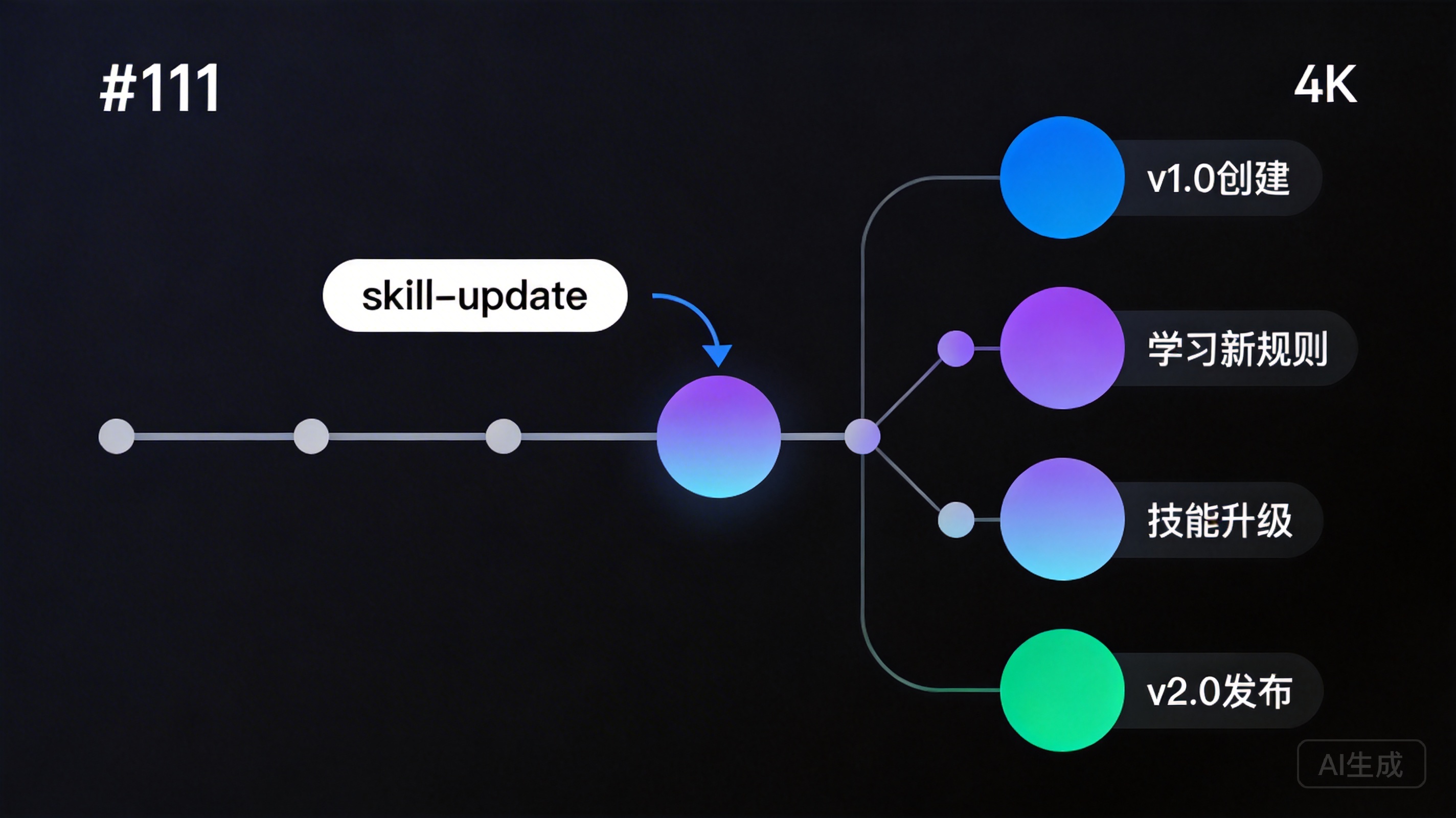
A core design decision in AgentFS is: every agent is a Git repository. This isn’t an optional add-on feature — it’s a foundational component of the system architecture.
Why Is Version Control So Important for Agents?
Traditional software has a clear version release process: develop, test, release, rollback. But agents are different — they’re continuously evolving. Through interactions with users, they constantly learn new knowledge, accumulate new memories, and even adjust their behavioral patterns.
This continuous evolution raises a critical question: how do you ensure evolution is controllable?
Without version control, the risks are substantial:
- The agent learned incorrect knowledge? You don’t know when it was introduced.
- Behavioral guidelines were accidentally modified? You don’t know what they originally said.
- A new skill version has problems? You can’t quickly revert to a stable version.
- Multiple team members simultaneously modified the same agent? Changes might overwrite each other.
Git provides elegant solutions to all these problems.
Specific Applications of Git in AgentFS
1. Complete Change History
Every modification to an agent — whether updating a behavioral guideline, adding a new skill, or the agent itself accumulating a new memory — forms a Git commit.
$ cd ~/.desirecore/agents/finance-assistant/
$ git log --oneline -10

a1b2c3d Update guidelines: raise amount threshold from $50K to $100K
e4f5g6h Add skill: accounts receivable aging analysis
i7j8k9l Memory update: user prefers line charts for trend data
m0n1o2p Fix: date format error in monthly report template
q3r4s5t Update persona: add communication guidance for non-finance staff
u6v7w8x Initialize agent configuration
Each commit record clearly describes the content of the change. You can see the agent’s evolution journey at a glance.
2. Precise Diff Tracking
Want to know exactly what changed in the behavioral guidelines?
$ git diff a1b2c3d^..a1b2c3d -- principles.md

- Operations involving amounts exceeding $50,000 must include a
  reminder for manual review
+ Operations involving amounts exceeding $100,000 must include a
  reminder for manual review
A single diff, with character-level change tracking. This has tremendous value in auditing and compliance scenarios.
3. Quick Rollback
New version has a problem? A single command rolls it back:
$ git revert a1b2c3d
# Undo the "amount threshold adjustment" change, reverting to the $50K threshold
Note the use of git revert rather than git reset — revert generates a new commit to undo the change, preserving the complete operation history. This means the “rollback” itself is also recorded, satisfying audit completeness requirements.
4. Branch Experimentation
Want to try a new communication style for the agent but unsure about the results? Create a branch:
$ git checkout -b experiment/casual-tone
# Modify persona.md on the branch, try a more casual communication style
# After testing for a while:
$ git checkout main    # Not working well? Return to main, branch changes don't affect production
$ git merge experiment/casual-tone  # Working great? Merge into main
This “safe experimentation” capability is nearly impossible to achieve in traditional database-backed storage solutions.
5. Collaboration and Merging
Multiple team members need to simultaneously modify an agent — Zhang is updating behavioral guidelines while Li is adding new skills:
# Zhang's changes
$ git commit -m "Update compliance-related behavioral guidelines"

# Li's changes
$ git commit -m "Add supplier evaluation analysis skill"

# Merge (Git automatically merges non-conflicting changes)
$ git merge li-branch
If two people modify the same part of the same file, Git will flag a conflict requiring manual resolution. This is much safer than the default behavior of “last writer overwrites previous writer.”
Git Commit Strategy
In AgentFS, we recommend the following commit strategy:
- Human modifications: Commit immediately after each manual change with meaningful commit messages
- AI auto-updates: Memory updates and other automatic operations use batch commits (e.g., hourly or at the end of each session) to avoid excessive commit frequency
- Major changes: Personality adjustments, guideline modifications, and other significant changes should ideally be made on branches first, then merged after testing and review
This strategy strikes a balance between flexibility and manageability.
Part Six: Tiered Loading Strategy — Balancing Transparency and Efficiency
The file system’s transparency solves the “human understanding” problem, but introduces another concern: efficiency.
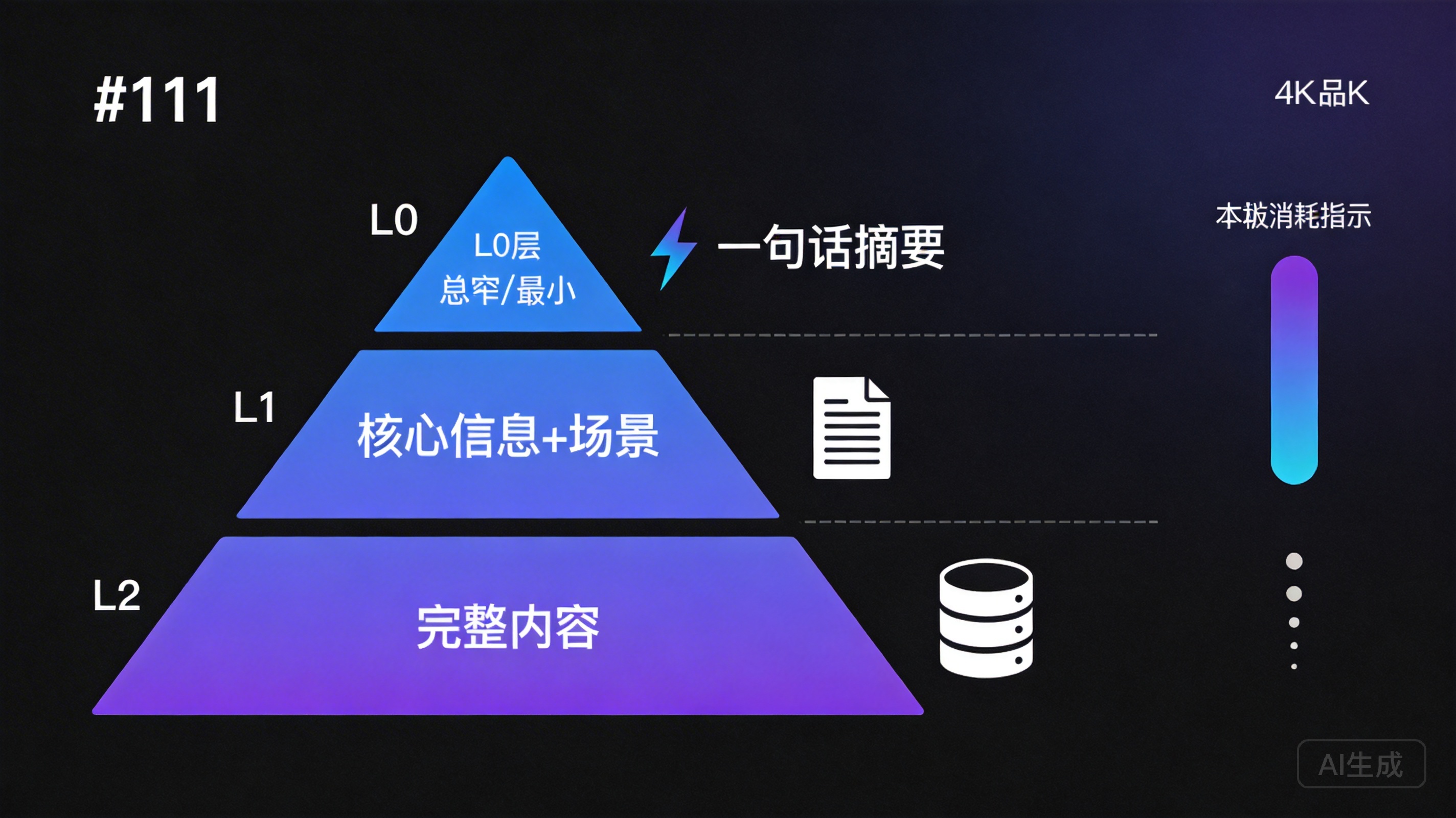
When an agent needs to execute a task, does it need to load all its files into context? Obviously not — that would consume enormous token counts and reduce inference quality. But if it only loads a subset of information, how does it know what other skills are available or what memories it can reference?
AgentFS’s solution is a three-tier loading strategy.
The Three-Tier Architecture
┌─────────────────────────────────────────────────┐
│  L0: One-line summary                           │
│  ─────────────────                              │
│  Minimal token consumption                      │
│  Purpose: Quick screening                       │
│  Example: "Financial analysis skill -           │
│           supports balance sheet analysis"       │
│                                                 │
│  ┌─────────────────────────────────────────┐    │
│  │  L1: Core info + applicable scenarios    │    │
│  │  ─────────────────                      │    │
│  │  Moderate token consumption             │    │
│  │  Purpose: Planning decisions            │    │
│  │  Example: Input/output formats,         │    │
│  │           applicable conditions         │    │
│  │                                         │    │
│  │  ┌─────────────────────────────────┐    │    │
│  │  │  L2: Full content                │    │    │
│  │  │  ─────────────────              │    │    │
│  │  │  On-demand token consumption    │    │    │
│  │  │  Purpose: Actual execution      │    │    │
│  │  │  Example: Complete skill defs   │    │    │
│  │  │           and templates         │    │    │
│  │  └─────────────────────────────────┘    │    │
│  └─────────────────────────────────────────┘    │
└─────────────────────────────────────────────────┘
L0: One-Line Summary — Quick Screening
The goal of the L0 tier is to let the agent know what it has with minimal tokens.
Every file (skills, memories, resources, tools) has a one-line summary. When an agent starts a new task, the first thing loaded is the L0 summary list of all files.
[Skill] financial-analysis: Financial statement analysis, deep analysis of three major statements
[Skill] report-generation: Automated report generation, supports monthly/quarterly/annual reports
[Skill] data-visualization: Data visualization, supports line/bar/pie charts
[Memory] user-preferences: User preference records (last updated: 2026-03-16)
[Tool] excel-reader: Excel file reading and parsing
[Tool] chart-generator: Chart generation tool
This list typically consumes only a few hundred tokens, but gives the agent a “panoramic view” of all its capabilities.
L1: Core Information — Planning Decisions
When the agent determines that a skill or memory might be relevant to the current task, it loads that item’s L1 information.
L1 is more detailed than L0 but still not the full content. It contains key information needed for decision-making: applicable scenarios, input/output formats, prerequisites, and limitations.
# L1 info example: financial-analysis skill
name: financial-analysis
summary: Financial statement analysis
applicable_scenarios:
  - Analyze balance sheets, income statements, cash flow statements
  - Calculate financial metrics (ROE, current ratio, etc.)
  - Year-over-year and quarter-over-quarter variance analysis
input_format: Financial data in Excel or CSV format
output_format: Analysis report in Markdown format
prerequisites:
  - Requires the excel-reader tool
  - Data must include complete account codes
limitations:
  - Does not support consolidated statement analysis
  - Maximum 100,000 rows per processing run
L1 information typically consumes several hundred to slightly over a thousand tokens, enabling the agent to judge: “Is this skill suitable for the current task? What conditions are needed to use it?”
L2: Full Content — Actual Execution
Only when the agent determines it will use a specific skill, reference a specific memory, or invoke a specific tool does it load L2’s full content.
L2 includes all detailed information for that file: complete skill definitions, detailed operational steps, all examples and templates. This is the most token-expensive tier, but it’s only loaded when actually needed.
The Practical Effect of Tiered Loading
Let’s illustrate the effect of tiered loading with a concrete example.
Suppose an agent has 20 skills, 50 memories, and 10 tools. Loading everything would consume approximately 50,000 to 100,000 tokens.
With the tiered loading strategy:
- L0 phase: Load one-line summaries for all 80 items, approximately 800 tokens
- L1 phase: Based on the current task, determine that 3 skills, 5 memories, and 2 tools might be relevant; load their L1 information, approximately 3,000 tokens
- L2 phase: Confirm using 1 skill, referencing 2 memories, and invoking 1 tool; load full content, approximately 5,000 tokens
Total consumption is approximately 8,800 tokens — less than 10% of full loading. Moreover, the loaded information is filtered and highly relevant to the current task, which also improves the model’s inference quality.
Natural Fit with the File System
The tiered loading strategy naturally aligns with the file system’s organizational approach.
In a file system, implementing tiered loading is very intuitive:
- L0 summaries can be stored as metadata for each file (e.g., the
summaryfield inskill.json), or centrally stored as an index file - L1 information is the file’s header section or metadata portion
- L2 is the file’s complete content
Loading L0 only requires reading the index file (one I/O operation), loading L1 only requires reading the first few dozen lines of the target file (partial I/O), and loading L2 requires reading the complete file. This progressive reading is very natural to implement in a file system.
Implementing similar tiered loading in a database-backed solution isn’t impossible, but requires additional table design — summary tables, detail tables, full-text tables — along with corresponding query optimization. In a file system, this tiering is inherently embedded in the data organization itself.
The Agent’s Autonomous Decision-Making
Tiered loading isn’t just a technical optimization — it also endows agents with a human-like “information retrieval” capability.
When humans face a problem, we don’t recall all our knowledge at once. We first make rapid associations — “Which things I’ve learned are related to this problem?” — then selectively retrieve relevant detailed memories. This is the human brain’s “attention” mechanism.
Tiered loading lets agents work in a similar way: first “scan” all capabilities and knowledge (L0), determine what’s relevant to the current task (L1 screening), then deep-dive into relevant detailed content (L2 loading). This progressive information retrieval not only saves tokens but also makes the agent’s reasoning process more focused and efficient.
Part Seven: Four Paradigms of File-Driven Architecture — Evolution, Review, Distribution, Rollback
AgentFS’s file-driven architecture doesn’t just solve storage problems — it gives rise to four powerful usage paradigms. These paradigms are either difficult to achieve or require extensive additional development in traditional database-backed solutions.
Paradigm One: Self-Evolution
Agents can directly modify their own files to learn new rules.
In AgentFS, agents have read/write access to their own files. This means they can:
- Record new events and learned knowledge in
memory/ - Optimize skill descriptions in
skills/based on usage feedback - Even modify their own
principles.mdunder certain conditions
Scenario: Agent discovers a repeatedly occurring data processing pattern

1. Agent identifies pattern: "Users frequently request quarterly
   aggregation before year-over-year analysis"

2. Agent creates a new procedural memory:
   memory/procedural/quarterly-aggregation-pattern.md
   ---
   ## Quarterly Aggregation Analysis Pattern
   When users request trend analysis, aggregate data by quarter
   by default, then perform year-over-year/quarter-over-quarter analysis.
   Applicable condition: Data span exceeds 6 months
   ---

3. Git records this self-learning:
   $ git commit -m "Self-learning: identify quarterly aggregation pattern"
Self-evolution is one of the most exciting capabilities of AI agents, but also one requiring the most caution. AgentFS ensures evolution is safe through the following mechanisms:
File-level permission control: You can configure agents to only modify the memory/ directory, not principles.md or persona.md. Core identity and guidelines are maintained by human administrators.
Git records all changes: Every self-modification by the agent is recorded in Git, allowing humans to review these changes at any time. If the agent learns inappropriate content, it can be discovered and corrected.
Change review workflow: For significant self-evolution (such as an agent wanting to modify its own skill definitions), you can require human approval before changes take effect, similar to a code Pull Request workflow.
Paradigm Two: Human Review
All changes are file diffs, reviewable like code reviews.
This is one of AgentFS’s most powerful features for AI governance.
Imagine this: your company has a customer service agent that accumulated new memories and optimized its response templates over the past month. As a manager, you need to review whether these changes are reasonable and compliant with company policy.
In traditional solutions, you’d need to open an admin dashboard, query a database, and compare snapshots at different points in time — complex and easy to miss things.
In AgentFS:
$ cd ~/.desirecore/agents/customer-service/
$ git log --since="1 month ago" --oneline

d1e2f3a Memory update: common return/exchange handling procedures
b4c5d6e Optimize: complaint handling scripts (emphasize empathy)
a7b8c9d New memory: promotional rules (Spring 2026)
e0f1g2h Skill update: add multi-channel complaint tracking
$ git diff b4c5d6e^..b4c5d6e
--- a/skills/complaint-handling/templates/initial-response.md
+++ b/skills/complaint-handling/templates/initial-response.md
- Thank you for your feedback. We will process your issue as
soon as possible.
+ I completely understand your feelings — this situation is
+ indeed frustrating.
+ I've already logged your issue and will begin working on it
+ immediately.
+ Is there any additional detail you'd like to add?Crystal clear. Reviewers can see:
- What changed (file diff)
- Why it changed (commit message)
- When it changed (commit timestamp)
- The change’s context (file path reveals the business domain)
This review approach is identical to code review in software development. For technical teams already familiar with Git workflows, reviewing agent changes and reviewing code changes are exactly the same experience.
Going further, you can even establish a Pull Request workflow for agent changes on GitHub or GitLab:
- The agent makes changes on its own branch
- Creates a Pull Request to merge into the main branch
- Relevant personnel review changes and provide feedback
- After review approval, merge, and changes take effect
This is true AI governance through process — agent behavioral changes are subject to the same level of control as code changes.
Paradigm Three: Software Distribution
Agents as Git repositories can be forked, cloned, and published to marketplaces.
AgentFS transforms agents into distributable “software.” Because every agent is a Git repository, all existing tools and processes from the software distribution domain can be directly reused.
Clone:
# Clone an agent from a remote repository
$ git clone https://hub.desirecore.com/agents/finance-assistant.git \
    ~/.desirecore/agents/finance-assistant/

# The complete agent — including all skills, memories, workflows — is now local
Fork:
# Create your own variant based on an existing agent
$ git clone finance-assistant my-finance-assistant
$ cd my-finance-assistant

# Modify persona.md to better fit your business scenario
# Add industry-specific skills and knowledge
$ git commit -m "Customize: adapt for manufacturing financial analysis"
Publish to marketplace:
# Publish your agent to the DesireCore marketplace
$ git tag v1.0.0
$ git push origin main --tags
# Other users can browse, rate, and clone your agent
This distribution model has several important advantages:
-
High starting point: No need to create agents from scratch. Find an agent close to your needs, fork it, and customize from there. Just like the open source software usage model.
-
Community effects: Excellent agents can be widely propagated and improved. A financial analysis agent created by one person can become increasingly powerful through sustained community contributions.
-
Traceable provenance: Git’s commit history ensures you can always trace back to the agent’s original version and complete change history.
-
Differentiated customization: Modifications after forking don’t affect the original agent — you can boldly make customization adjustments.
Paradigm Four: Version Rollback
Support git revert for quick rollback of failed updates.
In an agent’s continuous evolution, not all changes are successful. A new skill might introduce incorrect behavior, a new memory might contain inaccurate information, or a guideline modification might cause unexpected side effects.
In traditional solutions, rollback means:
- Finding the state before the change (may require database snapshots or manual backups)
- Determining exactly which changes to revert (tracking changes in databases is typically difficult)
- Executing the rollback operation (may require manual database record modification)
- Verifying rollback success (may require multiple checks)
In AgentFS, rollback is a simple, safe, and traceable operation:
# View recent change history
$ git log --oneline -5
a1b2c3d Add skill: automated report analysis (has issues)
e4f5g6h Memory update: quarterly data processing pattern
i7j8k9l Update guidelines: add data confidentiality clause
m0n1o2p Fix report template formatting
q3r4s5t Add customer complaint analysis skill

# Revert the problematic change
$ git revert a1b2c3d

# Confirm rollback result
$ git log --oneline -3
x9y0z1a Revert "Add skill: automated report analysis (has issues)"
a1b2c3d Add skill: automated report analysis (has issues)
e4f5g6h Memory update: quarterly data processing pattern
Key characteristics of the rollback operation:
- Precise: Can revert only a specific change without affecting other subsequent changes
- Safe: Uses
revertrather thanreset, preserving complete operation history - Traceable: The rollback itself is recorded as a commit, satisfying audit requirements
- Fast: Completed with a single command, no complex recovery procedures needed
For enterprise users, quick rollback capability is a “safety net” in production environments. When a customer-facing agent exhibits abnormal behavior, being able to revert to the last stable version in seconds is a key capability for ensuring business continuity.
The Synergy of Four Paradigms
These four paradigms don’t exist in isolation — they collectively form a complete agent lifecycle management framework:
- Create: Clone a base agent from the marketplace, or create from scratch (Distribution)
- Customize: Modify personality, guidelines, and skills based on business needs (Evolution)
- Validate: Review all changes to ensure they meet expectations (Review)
- Deploy: Put the validated version into production use
- Monitor: Observe the agent’s performance in actual use
- Iterate: Continue evolving based on feedback; rollback if problems arise (Evolution + Rollback)
The entire workflow is naturally supported by the file system and Git, requiring no additional tools or systems. This simplicity and unity is one of AgentFS’s proudest qualities.
Part Eight: A Practical Case Study — An Agent’s Complete Journey from Creation to Evolution
To make AgentFS’s concepts concrete rather than abstract, let’s walk through a complete practical case study.
Setting the Scene
Suppose you’re an operations manager at an e-commerce company, and you need to create an “Operations Assistant” agent to help with daily data analysis and report generation.
Day One: Creating the Agent
First, you decide to create your customized version based on the “General Data Analyst” agent from the DesireCore marketplace.
# Clone the base agent from the marketplace
$ desirecore agent clone market://data-analyst ops-assistant

# View the cloned file structure
$ tree ~/.desirecore/agents/ops-assistant/

ops-assistant/
├── agent.json
├── persona.md
├── principles.md
├── memory/
│   └── semantic/
│       └── domain-knowledge.md
├── skills/
│   ├── data-analysis/
│   ├── report-generation/
│   └── trend-detection/
├── workflows/
├── tools/
│   ├── excel-reader/
│   └── chart-generator/
├── resources/
└── .git/
Then you start customizing the agent.
Modify persona.md:
# Operations Assistant

## Role Definition
I am an intelligent assistant focused on e-commerce operations
data analysis. I understand core e-commerce metrics (GMV,
conversion rates, average order value, repurchase rates, etc.)
and can identify operational opportunities and risks from data.

## Communication Style
- Conclusions first: lead with core findings, then expand on details
- Data-driven: every conclusion is backed by specific numbers
- Action-oriented: analysis should cover not just "what" but "what to do"
- Uses terminology and metrics familiar to the operations team

## Core Metrics
- GMV and composition (by category, channel, region)
- Conversion funnel (UV → add to cart → place order → payment)
- Average order value and cross-sell rate
- Repurchase rate and customer lifetime value
- Marketing ROI (input-output ratio by channel)
Add e-commerce-specific behavioral guidelines to principles.md:
## E-Commerce Operations Special Guidelines
- When analyzing pricing strategies, ensure supplier cost
  information is not disclosed in conversations
- Promotional effectiveness analysis must consider the time
  dimension (year-over-year/quarter-over-quarter)
- Alert immediately when conversion rate drops anomalously (>5%)
- User segmentation analysis must follow the principle of minimal
  necessity, avoiding excessive profiling
Commit these customizations:
$ git add -A
$ git commit -m "Customize: adapt for e-commerce operations scenario"
Week One: Skill Expansion
After a few days of use, you discover the need for additional e-commerce-specific analysis skills.
You create a new skill directory:
skills/
└── promotion-analysis/
    ├── skill.json
    ├── description.md
    ├── examples/
    │   ├── singles-day-analysis.md
    │   └── weekly-promotion-analysis.md
    └── templates/
        └── promotion-report-template.md
description.md defines the detailed description of the promotion analysis skill:
# Promotional Effectiveness Analysis Skill

## Overview
Analyze promotional campaign effectiveness, including traffic uplift,
conversion rate changes, GMV contribution, profit impact, and user
quality assessment.

## Analysis Framework
1. **Traffic dimension**: Traffic sources and changes during the campaign
2. **Conversion dimension**: Conversion rate comparison across stages
   (pre-campaign vs. during vs. post-campaign)
3. **Sales dimension**: Changes in GMV, order volume, average order value
4. **Profit dimension**: Actual profit margins after discounts
5. **User dimension**: New customer ratio, repurchase predictions,
   quality user acquisition
6. **Long-term impact**: Campaign impact on brand value and price anchoring

## Input Requirements
- Sales data (daily granularity, including at least 7 days before and after)
- Traffic data (categorized by channel and source)
- Promotional rules (discount method, applicable scope)
- Cost data (optional, for profit analysis)
Commit the new skill:
$ git commit -m "Add skill: promotional effectiveness analysis"Month One: Self-Evolution
After a month of use, the agent has accumulated rich operational knowledge and usage experience.
Examine changes to the memory directory:
memory/
├── episodic/
│   ├── 2026-03-10.md    # "Analyzed week 1 March GMV, apparel up 15% MoM"
│   ├── 2026-03-15.md    # "Helped user identify mobile conversion rate decline"
│   └── 2026-03-20.md    # "Generated Q1 operations quarterly report"
├── semantic/
│   ├── domain-knowledge.md
│   ├── company-context.md    # New: business context understanding
│   └── metric-benchmarks.md  # New: industry benchmark accumulation
└── procedural/
    ├── daily-report-process.md   # New: optimal daily report process
    └── anomaly-detection.md      # New: data anomaly detection experience
The agent’s Git history records this evolution:
$ git log --oneline --since="1 month ago"

f1e2d3c Memory update: accumulate Q1 ops data analysis experience
a4b5c6d Procedural memory: optimize daily report generation process
e7f8g9h Semantic memory: update industry benchmark data
i0j1k2l Skill optimization: refine profit calculation in promo analysis
m3n4o5p Memory update: record mobile conversion rate diagnostic method
q6r7s8t Semantic memory: learn company business line structure
Review and Governance
As a manager, you periodically review the agent’s changes:
# View all changes for this month
$ git log --stat --since="1 month ago"

# Deep inspect a specific memory update
$ git show e7f8g9h

# Verify whether the industry benchmark data the agent learned is accurate
$ cat memory/semantic/metric-benchmarks.md
You discover the agent recorded an inaccurate industry benchmark in metric-benchmarks.md, so you correct it directly:
$ vim memory/semantic/metric-benchmarks.md
# Correction: e-commerce industry average conversion rate should be 2%-5%, not 5%-8%
$ git commit -m "Correction: calibrate e-commerce conversion rate benchmarks"
This is AgentFS’s human-machine collaboration model — the agent learns autonomously, humans review and verify, jointly ensuring knowledge accuracy.
Encountering Problems: Quick Rollback
One day, you update the agent’s report generation skill, but the new version produces reports with formatting issues.
# Find the problematic commit
$ git log --oneline -5
h1i2j3k Skill update: optimize report generation format (new version has issues)
f1e2d3c Memory update: accumulate Q1 ops data analysis experience
a4b5c6d Procedural memory: optimize daily report generation process
...

# Quick rollback
$ git revert h1i2j3k
# Report generation skill returns to the last stable version

# Fix the issue on a branch
$ git checkout -b fix/report-format
# After fixing the format issue...
$ git checkout main
$ git merge fix/report-format
$ git commit -m "Fix: report generation format issue (second version)"
The entire rollback and fix process is clear, controlled, and traceable.
Part Nine: Architecture Considerations for the Future
AgentFS’s design doesn’t just address current needs — it looks toward the long-term trends of AI agent development.
Multi-Agent Collaboration
When multiple agents need to collaborate on complex tasks, AgentFS’s file system architecture provides a natural collaboration foundation.
Each agent’s skills and knowledge are files, and agents can exchange information by sharing files. For example, a data collection agent writes results to a shared directory, and an analysis agent reads from the same directory to perform analysis. This file-based collaboration model is simple, intuitive, and doesn’t depend on complex message queues or RPC frameworks.
Agent Marketplace and Ecosystem
AgentFS makes agents a distributable digital good. You can envision a marketplace similar to GitHub:
- Developers publish agents they’ve created
- Users browse, rate, and clone agents of interest
- The community contributes improvements and new skills
- Enterprises publish agent templates for internal use
This marketplace requires no special technical infrastructure — Git repository hosting is sufficient. Agent distribution, version management, and collaborative improvement all reuse the Git ecosystem’s existing capabilities.
Compliance and Auditing
In regulated industries such as finance, healthcare, and law, AI system auditability is a hard requirement. AgentFS’s file + Git architecture naturally satisfies these requirements:
- All changes have a complete historical record
- Each change is traceable to a specific operator
- Change records are tamper-proof (guaranteed by Git’s hash chain)
- Auditing can be performed using standard Git tools
This makes AgentFS the ideal foundational architecture for deploying AI agents in regulated industries.
Edge Deployment and Offline-First
With the trend toward smaller AI models, more and more agents will run on edge devices — laptops, tablets, even phones. AgentFS’s local file system architecture perfectly fits this edge deployment pattern:
- All data is local, independent of cloud services
- Fully functional offline
- Syncs with the cloud via Git when online
- Data processing stays on-device, protecting privacy
This “local-first, cloud-sync” model holds important strategic value as data privacy and regulatory requirements become increasingly strict.
Conclusion: Transparency Is the Foundation of Trust
In this article, we’ve deeply explored AgentFS’s design philosophy, technical architecture, and application paradigms. Let’s return to the original question: Where should an AI agent’s “soul” live?
AgentFS’s answer is: In transparent files.
The logical chain behind this choice is clear:
- AI is becoming increasingly powerful → Humans need stronger means of understanding and control
- Understanding and control require transparency → Data must be directly viewable and understandable by humans
- Files are the most transparent form of data → Use files to carry the agent’s entire state
- Git provides complete change tracking → Every change is traceable, reviewable, and reversible
- Transparent systems earn trust → Users trust systems they can understand
In an era of rapidly expanding AI capabilities, we shouldn’t place AI governance on “trusting AI to do the right thing.” Instead, we should build mechanisms that allow humans to see, understand, and control AI behavior. AgentFS is precisely such a mechanism.
Files are the most transparent form of data. Transparency is the foundation of trust. Trust is the prerequisite for human-AI symbiosis.
That is the complete story of AgentFS.
If you’re interested in the technical details of AgentFS, we invite you to download DesireCore and experience it firsthand. Every file of every agent is on your hard drive, waiting for you to open it.